Tutorial · Azure DevOps
Cutting UI Regression Time with Parallel Test Jobs in Azure Pipelines
Split a slow UI regression suite across several Azure Pipelines agents with a parallel job strategy, then merge the results back into one report.
In this article5 sections
UI regression suites only grow. Every sprint adds scenarios and almost nothing gets removed, so a suite that ran in 40 minutes last year now takes three hours. At that point it runs overnight, the results arrive the next morning, and a failure has to be traced back through a whole day of commits.
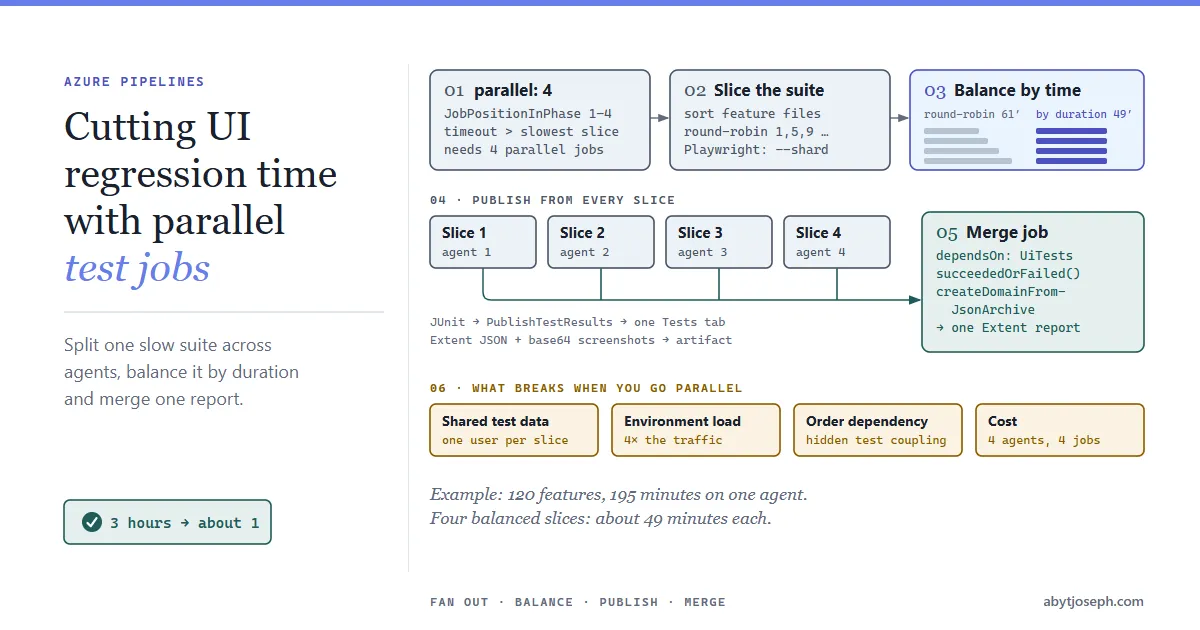
Take that three-hour suite as an example: say 120 feature files, about 195 minutes in total. Split four ways, it can’t finish in less than about 49 minutes, and at first the slowest slice decides, so expect closer to an hour. That still puts the results in front of the team within about an hour of a merge, not the next morning.
Running tests in parallel within one machine helps, but a single agent only has so much CPU, memory and browser capacity. In this article we will split the suite across several agents with Azure Pipelines’ parallel job strategy, run a slice on each, and merge the results back into one report.

How parallel jobs work in Azure Pipelines
Add a parallel strategy to a job and Azure Pipelines runs that many copies of it:
jobs:
  - job: UiTests
    timeoutInMinutes: 90
    strategy:
      parallel: 4
Jobs time out after 60 minutes by default, and the free Microsoft-hosted job can’t run longer than that, so set timeoutInMinutes above your slowest slice.
Each copy gets two predefined variables:
System.TotalJobsInPhase: how many copies there are (4).System.JobPositionInPhase: which copy this one is, from1to4.
The pipeline doesn’t split the tests for you. Each copy runs the same steps, and those steps have to use the two variables to pick their share of the suite.
How many copies actually run at the same time depends on two things. An agent runs one job at a time, so in a self-hosted pool four slices need four agents (on Microsoft-hosted pools each job gets a fresh agent). And your organisation needs four parallel jobs of the right type, Microsoft-hosted or self-hosted. With only a free parallel job (Microsoft-hosted or self-hosted), the four slices run one after another and you’ve gained nothing except a longer log.
If the run isn’t any faster, check Organization settings >> Pipelines >> Parallel jobs before you blame the slicing.
Slice the suite
The simplest split that works is round-robin over a sorted list of test files: slice 1 takes files 1, 5, 9…, slice 2 takes 2, 6, 10…, and so on. Sorting matters. Every slice must see the same list in the same order, or a file can be run twice or skipped.
For Cucumber, list the feature files and pass this slice’s share to Cucumber with the cucumber.features property:
- pwsh: |
    $root = (Get-Location).Path
    $all = @(Get-ChildItem -Path src/test/resources/features -Recurse -Filter *.feature |
      Sort-Object FullName |
      ForEach-Object { $_.FullName.Substring($root.Length + 1).Replace('\', '/') })

    $index = [int]$env:SYSTEM_JOBPOSITIONINPHASE - 1
    $total = [int]$env:SYSTEM_TOTALJOBSINPHASE
    if ($total -lt 1) { $index = 0; $total = 1 }   # not running with strategy: parallel
    $mine = for ($i = $index; $i -lt $all.Count; $i += $total) { $all[$i] }

    Write-Host "Slice $($index + 1) of $total runs $(@($mine).Count) of $($all.Count) feature files"
    Write-Host "##vso[task.setvariable variable=SLICE_FEATURES]$($mine -join ',')"
  displayName: Pick this slice's feature files

- script: mvn -B test -Dsurefire.includeJUnit5Engines=cucumber -Dcucumber.features="$(SLICE_FEATURES)" -Dslice=$(System.JobPositionInPhase)
  displayName: Run UI tests (slice $(System.JobPositionInPhase))
The step uses pwsh, which Microsoft-hosted images include; on a self-hosted Windows agent install PowerShell 7 or use powershell: instead. With Cucumber’s JUnit Platform engine, cucumber.features makes Cucumber ignore the JUnit Platform’s own selectors, which can run the features more than once (for example alongside a @Suite runner class). -Dsurefire.includeJUnit5Engines=cucumber (Surefire 3.0.0-M6 or later) prevents that. The older JUnit 4 @RunWith(Cucumber.class) runner doesn’t need it.
Keep the number of slices at or below the number of feature files. A slice with an empty list leaves $(SLICE_FEATURES) unexpanded. Depending on the agent’s shell, that becomes an empty property or a bogus path, and either can mean “run everything” or “fail”.
The same pattern works for other runners:
-
JUnit or TestNG with Maven: slice the test class names instead and pass them as
-Dtest=LoginTest,CheckoutTest,…. -
Playwright: it has sharding built in, and the variables already match its 1-based format:
- script: npx playwright test --shard=$(System.JobPositionInPhase)/$(System.TotalJobsInPhase)
Balance by duration, not by count
Round-robin assumes every file takes about the same time. They don’t. One checkout feature with 30 scenarios can take longer than ten small ones, and the whole run is only as fast as its slowest slice.
Once the split works, balance it using durations from the last run. Store each file’s duration from the previous JUnit results, then assign files longest first, each to whichever slice currently has the least total time. Every slice must read the same durations file (for example a committed file, or an artifact from the last run) and break ties the same way, or the slices compute different assignments and files are skipped or run twice. Cucumber’s JUnit XML is per scenario, so add the durations up per feature file. Even rough durations usually bring the slices to within a few minutes of each other.
In the example above, round-robin might leave the four slices at 38, 44, 52 and 61 minutes, so the run takes 61. Balanced by duration, the same 195 minutes come to about 49 minutes per slice, and the run finishes 12 minutes sooner without adding an agent.
Publish results from every slice
Publish the JUnit results in every slice job. Azure DevOps collects every published run into the pipeline’s Tests tab, so you get one combined view of pass rates and failures without any extra work:
- task: PublishTestResults@2
  condition: succeededOrFailed()
  inputs:
    testResultsFormat: JUnit
    testResultsFiles: '**/target/surefire-reports/TEST-*.xml'
    testRunTitle: UI tests - slice $(System.JobPositionInPhase)
HTML reports are a different story. Four slices produce four ExtentReports, and nobody wants to open four reports to read one run. With the ExtentReports Cucumber adapter (tech.grasshopper:extentreports-cucumber7-adapter, registered as a Cucumber plugin), have each slice write its results as JSON too, and keep them as a pipeline artifact:
# extent.properties
extent.reporter.spark.start=true
extent.reporter.spark.out=target/extent/spark/index.html
extent.reporter.spark.base64imagesrc=true
extent.reporter.json.start=true
extent.reporter.json.out=target/extent/json/extent.json- task: PublishPipelineArtifact@1
condition: succeededOrFailed()
inputs:
targetPath: target/extent/json
artifact: extent-json-$(System.JobPositionInPhase)base64imagesrc=true embeds screenshots in the report, not as separate files. That makes the merged report much bigger, but the screenshots survive the merge, and relative image paths from four different agents wouldn’t.
Merge the reports
A final job waits for every slice, downloads the JSON files and builds one Spark report from them. ExtentReports can load a JSON archive back into a report with createDomainFromJsonArchive, so the merge only needs a few lines of Java in the test project:
package reports;

import com.aventstack.extentreports.ExtentReports;
import com.aventstack.extentreports.reporter.ExtentSparkReporter;
import java.io.IOException;
import java.nio.file.Files;
import java.nio.file.Path;
import java.nio.file.Paths;
import java.util.stream.Collectors;
import java.util.stream.Stream;

public class MergeExtentReports {

    public static void main(String[] args) throws IOException {
        ExtentReports extent = new ExtentReports();
        extent.attachReporter(new ExtentSparkReporter("target/extent-merged/index.html"));

        try (Stream<Path> files = Files.walk(Paths.get(args[0]))) {
            for (Path json : files.filter(p -> p.toString().endsWith(".json")).sorted().collect(Collectors.toList())) {
                extent.createDomainFromJsonArchive(json.toFile());
            }
        }
        extent.flush();
    }
}- job: MergeReports
dependsOn: UiTests
condition: succeededOrFailed()
pool:
vmImage: ubuntu-latest
steps:
- task: DownloadPipelineArtifact@2
inputs:
patterns: 'extent-json-*/**'
path: $(Pipeline.Workspace)/extent-json
- script: >
mvn -B -q test-compile exec:java
-Dexec.mainClass=reports.MergeExtentReports
-Dexec.classpathScope=test
-Dexec.args="$(Pipeline.Workspace)/extent-json"
displayName: Merge Extent reports
- task: PublishPipelineArtifact@1
inputs:
targetPath: target/extent-merged
artifact: ui-test-reportcondition: succeededOrFailed() is important here. If any slice has a failing test, the UiTests job fails, and a failing run is exactly when you need the merged report.
What breaks when you go parallel
Splitting the suite is the easy part. These are the problems that show up in the first week.
Test data is the first thing to break. Four slices logging in as the same test user at the same moment will fight over sessions and baskets. Give each slice its own data; the -Dslice property above can pick a user per slice, such as uitest-1 to uitest-4.
Then the test environment. Four agents send four times the traffic, and an environment sized for one overnight run may slow down or start throwing errors. The tests get flaky in ways they never were on one agent, and it’s easy to blame the tests (handling flaky tests in Azure DevOps covers how to tell the difference).
Order dependency shows up too. A test that only passed because another test ran before it will fail once the two land in different slices. That’s a bug in the test, and honestly, finding those is a nice side effect of going parallel.
And it isn’t free. Four slices mean four agents and four parallel jobs, so decide what faster feedback is worth to the team before you go to eight.
You can combine both kinds of parallelism: several slices across agents, each running a few scenarios at once inside its own JVM. Start with one level and make it stable before adding the second, or you won’t know which one caused a new failure.
Hope that was helpful! :)