Tutorial · Azure DevOps
Using Azure Key Vault Secrets in Test Automation Pipelines
Keep test credentials and API keys out of your test framework by storing them in Azure Key Vault and passing them to automated tests in Azure DevOps pipelines.
In this article8 sections
Almost every automated test suite needs secrets: a test user’s password, an API key, a client secret for a token call, a database connection string. Too often they end up in a config.properties file in the repo, or as plain-text pipeline variables that anyone with access can read.
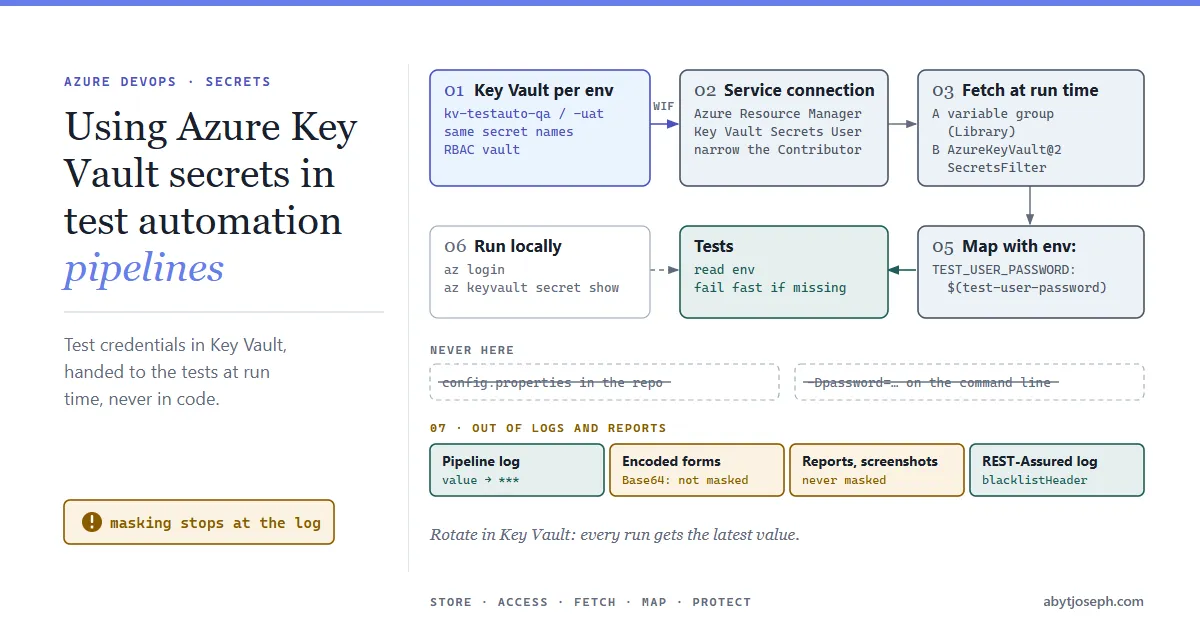
In this article we will see how to keep those secrets in Azure Key Vault, pull them into an Azure DevOps pipeline at run time, and hand them to the tests without them showing up in the code, the logs or the test reports.
There are two ways to get Key Vault secrets into a pipeline:
| Variable group linked to Key Vault | AzureKeyVault@2 task |
|
|---|---|---|
| Set up in | Pipelines >> Library (UI) | The pipeline YAML |
| Which secrets | The ones you pick in the variable group | Filtered per pipeline (SecretsFilter) |
| New secrets in the vault | Have to be added to the group manually | Picked up automatically with * |
| Good for | Sharing one set of secrets across many pipelines | Keeping everything in the YAML |
Both fetch the latest secret values at run time, so rotating a password in Key Vault doesn’t need a pipeline change. Both are shown below. Pick one.
Create the Key Vault and add the secrets
Create a vault that uses Azure RBAC for permissions, and add the secrets the tests need. Creating an RBAC vault doesn’t give you access to its secrets: to create secrets you need the Key Vault Secrets Officer or Key Vault Administrator role on the vault, and Owner of the subscription alone isn’t enough. The block below grants it to you before adding the secrets:
$rg = "rg-test-automation"
$kv = "kv-testauto-qa"   # must be globally unique

az group create --name $rg --location uksouth

az keyvault create `
  --name $kv `
  --resource-group $rg `
  --enable-rbac-authorization true

# RBAC vaults give the creator no access to secrets; grant yourself Secrets Officer
$me = az ad signed-in-user show --query id -o tsv
$kvId = az keyvault show --name $kv --query id -o tsv
az role assignment create --role "Key Vault Secrets Officer" `
  --assignee-object-id $me --assignee-principal-type User --scope $kvId
# role assignments can take a few minutes to take effect

az keyvault secret set --vault-name $kv --name test-user-password --value "<password>"
az keyvault secret set --vault-name $kv --name payments-api-key --value "<api key>"
Secret names can only contain letters, numbers and dashes. The names become pipeline variable names, so choose them carefully: test-user-password is referenced as $(test-user-password).
To create a role assignment you need Owner, User Access Administrator or Key Vault Data Access Administrator on the vault. If secret set returns 403 (Forbidden), wait a few minutes for the role assignment to apply and run it again.
Give the pipeline access to the vault
The pipeline reads the vault through an Azure Resource Manager service connection. Create one in Project settings >> Service connections >> New service connection >> Azure Resource Manager. Choose App registration (automatic) with Workload identity federation (the recommended option), so there is no client secret to expire or rotate. Under Security, don’t grant access to all pipelines; authorize the pipelines that need it.
Behind the service connection is a service principal (an app registration or managed identity). If service principals are new to you, see Authentication for Azure REST APIs using Azure AD Service Principals (that article uses a client secret; here you don’t need one).
The automatic option also gives the identity Contributor on the subscription, or on the resource group if you pick one. That is far more than a test pipeline needs, so pick the vault’s resource group as the scope, or remove that role assignment afterwards. Reading secrets only needs Key Vault Secrets User, which can read secret values but can’t change them. Give it to the identity, scoped to the vault only:
$appId = "<service connection's application (client) ID>"
$kvId = az keyvault show --name $kv --query id -o tsv

az role assignment create `
  --role "Key Vault Secrets User" `
  --assignee $appId `
  --scope $kvId
You can find the application ID in the service connection’s Manage App registration or Manage identity link. As before, you need Owner, User Access Administrator or Key Vault Data Access Administrator to run this, and it can take a few minutes before the first pipeline run succeeds. If you can’t read Microsoft Graph, --assignee <appId> may fail to resolve; use --assignee-object-id <service principal object ID> --assignee-principal-type ServicePrincipal instead.
Option A: a variable group linked to the vault
- In Azure DevOps, go to Pipelines >> Library >> + Variable group and name it
test-secrets-qa. - Turn on Link secrets from an Azure key vault as variables.
- Select the service connection and select Authorize, then select the vault, + Add and select the secrets.
- Save, then under Pipeline permissions allow the test pipeline to use the group.
Reference the group in the pipeline:
variables:
  - group: test-secrets-qa
Only the secret names are stored in the group; the values are fetched from the vault on every run. If you add a new secret to the vault, you have to add it to the variable group as well.
Option B: the Azure Key Vault task
To keep everything in YAML, fetch the secrets with the AzureKeyVault@2 task at the start of the job:
steps:
  - task: AzureKeyVault@2
    displayName: Get test secrets
    inputs:
      azureSubscription: sc-test-automation   # service connection name
      KeyVaultName: kv-testauto-qa
      SecretsFilter: test-user-password,payments-api-key
      RunAsPreJob: false
SecretsFilter takes a comma-separated list, or * for every secret in the vault. Listing names is better: the job only gets the variables it needs. (Key Vault Secrets User covers both reading and listing, so there’s no permission difference with RBAC.) With * the task skips disabled and expired secrets; a named secret that is disabled or expired fails the task instead, which helps when a secret seems to “disappear”. With RunAsPreJob: true the secrets are fetched before the job starts, so they are available to every step in the job.
Pass the secrets to the tests
The step that catches most people out: secret variables are not turned into environment variables automatically. A plain mvn test step won’t see test-user-password at all. Map each secret explicitly with env::
- script: mvn -B test -Denv=qa
  displayName: Run tests
  env:
    TEST_USER_PASSWORD: $(test-user-password)
    PAYMENTS_API_KEY: $(payments-api-key)
Don’t pass secrets on the command line (-Dpassword=$(test-user-password)): the real value ends up in the process list (masking only applies to the pipeline log), and some tools log their arguments. Environment variables are safer.
In the test framework, read them from the environment and fail fast if one is missing:
public final class Secrets {

    private Secrets() {}

    public static String get(String name) {
        String value = System.getenv(name);
        if (value == null || value.trim().isEmpty()) {
            throw new IllegalStateException(
                "Secret " + name + " is not set. In the pipeline, map it with env:; locally, see README.");
        }
        return value;
    }
}

// usage
String password = Secrets.get("TEST_USER_PASSWORD");
Failing fast with a clear message is much better than a login test failing twenty minutes later with “invalid credentials”.
Running the tests locally
Developers can use the same vault, so nobody keeps passwords in local files. Give them (or their team’s group) Key Vault Secrets User on the QA vault, then before running the tests:
az login
$env:TEST_USER_PASSWORD = az keyvault secret show --vault-name kv-testauto-qa --name test-user-password --query value -o tsv
$env:PAYMENTS_API_KEY  = az keyvault secret show --vault-name kv-testauto-qa --name payments-api-key  --query value -o tsv
mvn test -Denv=qa
On macOS or Linux, use export TEST_USER_PASSWORD=$(az keyvault secret show --vault-name kv-testauto-qa --name test-user-password --query value -o tsv) and the same for the API key.
The variables only last for that terminal session. Put the snippet in a script in the repo (with no values in it) so everyone uses the same names.
Keep secrets out of logs and reports
Azure Pipelines masks secret values in the pipeline logs, replacing them with ***. It’s a safety net with gaps:
-
Only the value itself, and a few escaped forms, are masked. If a test Base64-encodes a password (for example inside a
Basicauth header), prints part of it, or builds it into a longer token, that form is printed in full. -
Masking only applies to the pipeline log. Your test reports, screenshots and HTML artifacts aren’t touched. An ExtentReports or Cucumber report that logs a full login request will contain the password, and anyone who can open the report can read it.
-
Request logging is the usual culprit. REST-Assured’s
.log().all()prints headers, includingAuthorization. Hide sensitive headers in the log config:import io.restassured.RestAssured; import io.restassured.config.LogConfig; RestAssured.config = RestAssured.config() .logConfig(LogConfig.logConfig().blacklistHeader("Authorization", "x-api-key"));Header blacklisting doesn’t hide the request body or form parameters, so don’t use
.log().all()on login calls.
Treat test reports as something that may be shared widely, and log what was tested, not the credentials used.
Common issues
ForbiddenByRbac/ “Caller is not authorized to perform action on resource” (RBAC vaults) or “does not have secrets get/list permission” (access-policy vaults). The service connection’s identity has no access to the vault. Assign Key Vault Secrets User on the vault (RBAC) or add Get and List for secrets (access policy vaults). A new role assignment can take a few minutes to apply.ForbiddenByFirewall/ “Client address is not authorized”. The vault’s firewall blocks the agent. Microsoft-hosted agents don’t have fixed IP addresses, so either allow the Microsoft-hosted agent IP ranges (published weekly), or run on a self-hosted agent inside an allowed network with Option B (the task). Variable groups don’t support RBAC vaults behind a private endpoint.- The literal text
$(test-user-password)reaches the test. The variable doesn’t exist, usually a typo, a secret that isn’t in the variable group, or a secret filtered out bySecretsFilter. Azure Pipelines leaves unknown$(...)references unexpanded. - The environment variable is empty in the test. The secret wasn’t mapped with
env:on that step. The mapping applies to one step only, so repeat it on every step that needs the secret. - A new secret doesn’t show up through the variable group. Variable groups don’t pick up new secrets automatically. Edit the group, + Add the secret and save.
- The pipeline is waiting for permission. The first run that uses a new service connection or variable group needs someone to Permit it on the run page.
Hope that was helpful! :)