Tutorial · Azure
What Test Automation Infrastructure on Azure Actually Costs
Where the money goes when you run test automation on Azure and Azure DevOps, with list prices for each piece and the changes that cut an example setup's bill by around 70%.
In this article4 sections
Test automation infrastructure rarely gets a budget line of its own. It grows a piece at a time: an agent VM for the UI tests, a couple of extra parallel jobs when the queue got long, a Bastion host so someone could RDP in, a reports site. Each looked cheap when it went in. Nobody adds them up until someone from finance asks why the “test” resource group costs more than some production systems.
In this article we will go through what each piece costs, using Azure’s published list prices, and the changes that cut the bill for an example setup by around 70% without making the tests any slower to give feedback.
Where the money goes
Prices below are pay-as-you-go list prices in USD for the UK South region as of October 2026, from Azure’s Retail Prices API and the Azure DevOps pricing page. Your region, currency and any enterprise agreement will change the exact numbers, not the shape.
| Item | List price | What drives it |
|---|---|---|
Agent VM, D4s_v5 Windows |
$0.406 per hour (about $296 per month 24/7) | Hours the VM is running |
Agent VM, D4s_v5 Linux |
$0.222 per hour (about $162 per month 24/7) | Hours running; no Windows licence in the price |
| OS disk, Premium SSD P10 (128 GB) | $23.85 per month | Billed while the disk exists, even with the VM stopped |
| OS disk, Standard SSD E10 (128 GB) | $10.56 per month, plus a small, capped per-transaction charge | Same, but cheaper and fast enough for most test agents |
| Azure Bastion, Basic | $0.19 per hour (about $139 per month) | Hours it exists, used or not |
| Microsoft-hosted parallel job | $40 per month each | One free once you enable it (60-minute jobs, 1,800 minutes a month) |
| Self-hosted parallel job | $15 per month each | One free, plus one per Visual Studio Enterprise subscriber |
| Static Web Apps, Standard | $9 per app per month (not offered in UK South; same price in nearby regions) | Free plan covers most report sites |
| Log Analytics ingestion | $2.88 per GB | First 5 GB per billing account per month free |
| Image versions, snapshots | From $0.053 per GB per month (Standard HDD snapshot storage; SSD-backed snapshots cost more) | Per replica, for every version you keep |
| Key Vault, Standard | $0.03 per 10,000 operations | Almost nothing for test secrets |
Two rows deserve a second look. Bastion costs nearly half as much as the VM it connects to, and it bills every hour it exists, even if nobody connects for a month. Parallel jobs are billed per job, not per agent. Buying three self-hosted jobs for a pool with one agent gains you nothing: that agent can only run one job at a time.
An example setup, before and after
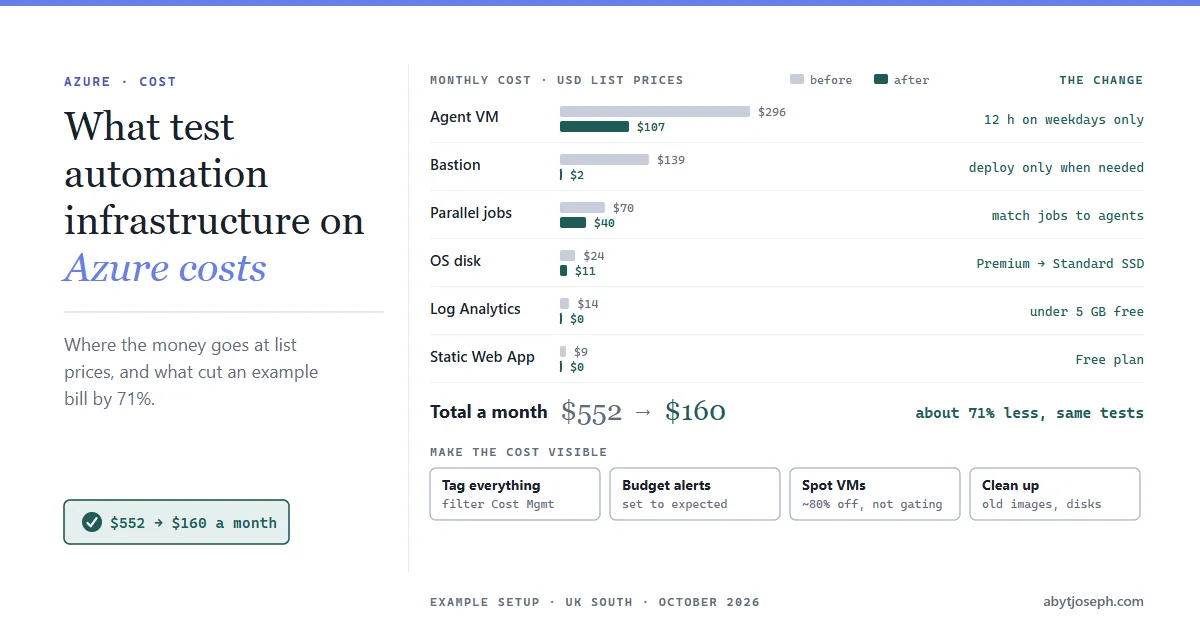
A typical small setup, the kind that builds up over a year or two: one Windows agent VM for UI tests running all day, a Premium disk, Bastion for remote access, one paid Microsoft-hosted parallel job plus two paid self-hosted jobs, a Standard Static Web App for reports, and about 10 GB a month going into Log Analytics.

| Item | Before | Change | After |
|---|---|---|---|
| Agent VM | $296.38 (24/7) | Runs 12 hours on weekdays only (22 weekdays) | $107.18 |
| Bastion | $138.70 (always on) | Deployed only when someone needs to connect, about 10 hours a month | $1.90 |
| Parallel jobs | $70.00 (1 hosted + 2 self-hosted) | Self-hosted jobs matched to agents; the free one covers a single agent | $40.00 |
| OS disk | $23.85 (Premium P10) | Standard SSD E10 | $10.56 |
| Log Analytics | $14.40 (10 GB) | Noisy logs filtered out, under the 5 GB free allowance | $0.00 |
| Static Web App | $9.00 (Standard) | Free plan; reports are well under 250 MB | $0.00 |
| Total | $552.33 | $159.64 |
The E10 figure leaves out Standard SSD’s small transaction charge, so the disk saving is slightly less than shown.
That’s about 71% less, and the tests run exactly as before. These are the example’s numbers, not a benchmark. Your biggest item might be different, but in most setups it’s an agent that runs all day and is busy for a few hours of it.
The changes that made the difference
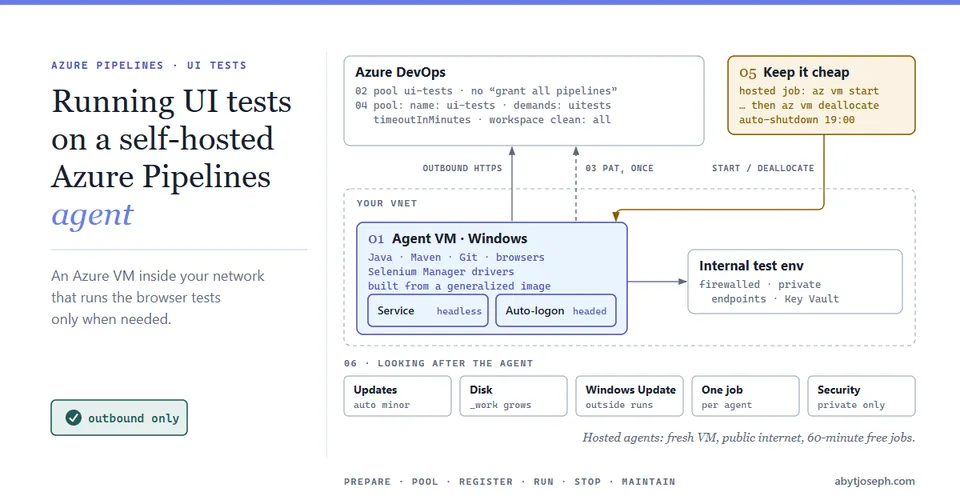
Run agent VMs only when there’s work
An agent VM that’s busy for a few hours of the working day and sits idle the rest is mostly paying for idle time. In the example, the first pipeline of the day starts the VM and a daily auto-shutdown stops it at 19:00:
az vm auto-shutdown -g rg-test-agents -n vm-uitest-01 --time 1900 # UTC: 20:00 in the UK in summerThe start has to run in an earlier job on a Microsoft-hosted agent (or another always-on pool). In the test job itself, which targets the stopped agent, it would queue forever:
jobs:
  - job: StartAgentVm
    pool:
      vmImage: ubuntu-latest
    steps:
      - task: AzureCLI@2
        inputs:
          azureSubscription: sc-test-automation
          scriptType: bash
          scriptLocation: inlineScript
          inlineScript: az vm start -g rg-test-agents -n vm-uitest-01

  - job: UiTests
    dependsOn: StartAgentVm
    pool:
      name: ui-tests
That job uses the paid Microsoft-hosted parallel job the example keeps. Give the service connection a role scoped to the VM that can start it, not Contributor on the subscription; running UI tests on a self-hosted agent shows a least-privilege custom role. If the agent only runs one nightly regression instead, a fixed 19:00 shutdown would leave it on most of the next day (and could cut off a long run), so deallocate it in a final job of that pipeline with az vm deallocate instead.
Shutting the VM down from inside Windows isn’t enough. A VM that’s stopped but not deallocated is still billed for compute, and it’s an easy one to miss in the portal. Auto-shutdown and az vm deallocate both deallocate.
Spot VMs are worth a look for agents too. They use spare Azure capacity at a large discount (about 80% for D4s_v5 in UK South as of October 2026), but Azure can evict them at short notice. For test agents that’s often acceptable: the job fails, and you rerun it. Avoid spot for the agent that runs the release-gating suite.
Pay for parallel jobs you actually use
Open your agent pool and select Analytics for the pool consumption report. It shows running and queued jobs against your parallel job limit for the last 30 days. You need to be a Project Collection Administrator to see it. If the running line rarely reaches the limit, you’re paying for jobs that sit unused. If jobs queue all day, more parallel jobs may be worth it, but only if you have the agents to run them on.
Check the free grants before buying anything. Every organisation gets one free self-hosted parallel job, plus one for each Visual Studio Enterprise subscriber in the organisation. Many teams already have several and don’t know it. The free Microsoft-hosted job isn’t automatic: you enable it by linking a subscription.
Don’t keep Bastion running for occasional RDP
Bastion is billed by the hour from the moment it’s deployed. If people only RDP to test agents now and then, deploy it when needed and delete it afterwards. Deploy it with Configure manually and choose the Basic tier, because the one-click Deploy Bastion button deploys Standard ($0.29 an hour in UK South). Allow about 10 minutes. Basic also needs a Standard static public IP (about $3.65 a month if you keep it), so delete the IP along with Bastion. Or design the agents so nobody needs to RDP in: an agent built from an image and configured by script can be replaced rather than repaired.
If one person connecting to one VM at a time is enough, the Developer tier of Bastion is free, with no hourly or data charge. It’s available in UK South, but it runs on shared infrastructure, connects to a single VM at a time through the portal, doesn’t support virtual network peering (which matters if the agents sit in a peered spoke VNet), and has fewer features than Basic, so check it covers how your team works before relying on it.
Use the free tiers you qualify for
The Static Web Apps Free plan covers a test report site, with 250 MB per environment and built-in authentication. Its other limits are 500 MB across all environments, 15,000 files and 100 GB of bandwidth a month with no overage, which Playwright traces, videos or Allure history can reach. Log Analytics includes 5 GB a month per billing account. That allowance is shared across every workspace on the billing account, so in a larger organisation it’s probably already used and the saving is about $2.88 per GB you stop sending. Agent VMs with every diagnostic setting switched on can also blow through it, so collect what you actually look at and set a daily cap on test workspaces. Standard SSD is fast enough for nearly every test agent; Premium SSD is for workloads that genuinely need the I/O.
Clean up what nobody uses
Old image versions, unattached disks from deleted VMs, snapshots “just in case”, and preview environments from long-merged branches all cost a little each month, and the costs add up. Set an end-of-life date on image versions and delete the old ones, and review the test resource groups every quarter.
Make the cost visible
Cost only goes down when someone can see it. Two habits keep it visible:
- Tag everything that belongs to test automation, for example
purpose=test-automationandowner=qa-team, and filter Cost Management by those tags. An Azure Policy that requires the tags on new resources stops untagged resources creeping back in. - Set a budget with alerts on the test resource group, so the team hears about a forgotten VM in the first week, not on the next invoice. The
az consumptioncommands are in preview:
az consumption budget create `
  --budget-name test-automation-monthly `
  --resource-group rg-test-agents `
  --amount 200 `
  --category cost `
  --time-grain monthly `
  --start-date 2026-10-01 `
  --end-date 2027-09-30
Scope the budget to everything you tagged purpose=test-automation (or put it all in one resource group). The $160 includes the parallel jobs, billed through the Azure DevOps organisation, and the Static Web App and Log Analytics workspace, which may sit in other resource groups. If only the VM, disk and Bastion are in rg-test-agents, the budget sees about $120.
Add the alert recipients and thresholds in Cost Management >> Budgets, or script them with az consumption budget create-with-rg --notifications (also in preview). Set them against the cost you expect, not a round number. In the example above, the “after” setup costs about $160 a month, which is already 80% of a $200 budget, so an 80% alert would fire every month and soon be ignored. Alerts at 100% of actual cost and 100% of forecast cost are the useful ones here.
Then the budget earns its keep. If the agent VM is left running around the clock, its line goes from about $107 back to $296, the month heads for roughly $350, and the forecast alert fires within the first few days instead of the overspend turning up on the invoice.
PS: none of this is glamorous, but a test platform that costs a third as much is a lot easier to defend the next time someone asks what the test subscription is for! :)
Sources
- Microsoft Learn. Azure Retail Prices REST API.
- Microsoft Azure. Azure DevOps Services pricing.

Written by