Tutorial · Test Automation
Handling Flaky Tests in Azure DevOps Pipelines
Detect, report and contain flaky automated tests in Azure DevOps with test reruns, flaky test management, Test Analytics and a quarantine, so a red pipeline means something again.
In this article6 sections
A flaky test is one that passes and fails on the same code without anything changing. One or two are an annoyance. A dozen and the team stops trusting the pipeline: a red run gets re-queued until it goes green, nobody looks at the failures, and a real bug eventually slips through the noise.
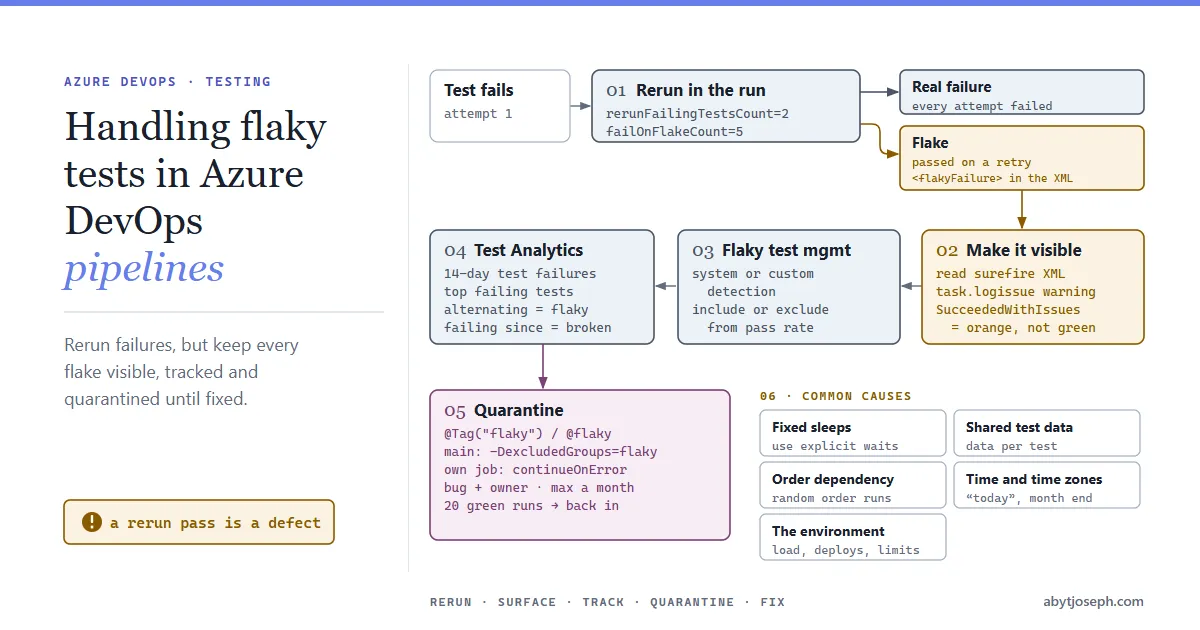
In this article we will see how to deal with flaky tests in Azure DevOps: rerun failures so one bad attempt doesn’t fail the run, make sure the flakiness is still visible, find the worst offenders with Test Analytics, and quarantine tests that can’t be fixed straight away.
Rerun failed tests in the test run
Most test frameworks can retry a failed test straight away. With Maven, Surefire reruns failed tests for JUnit 4.12+ and JUnit 5 (since 3.0.0-M4), and for TestNG from 3.6.0, when all frameworks moved to the JUnit Platform provider. Cucumber scenarios run through the JUnit Platform are rerun too (see the note below). failOnFlakeCount needs 3.0.0-M6 or later:
<plugin>
    <groupId>org.apache.maven.plugins</groupId>
    <artifactId>maven-surefire-plugin</artifactId>
    <version>3.6.0</version>
    <configuration>
        <rerunFailingTestsCount>2</rerunFailingTestsCount>
        <failOnFlakeCount>5</failOnFlakeCount>
        <!-- Cucumber only: lets Surefire tell scenarios and examples apart on rerun -->
        <properties>
            <configurationParameters>cucumber.junit-platform.naming-strategy=long</configurationParameters>
        </properties>
    </configuration>
</plugin>rerunFailingTestsCount: a failed test is run up to two more times. If any attempt passes, the test counts as passed and is reported as a flake; if all attempts fail, it’s a normal failure.failOnFlakeCount: fails the run once the number of flakes reaches five. Without a limit, a slowly rotting suite stays green while more and more tests only pass on their second try.
For Cucumber, the naming-strategy=long line is needed because Surefire doesn’t include enough information to tell different examples and scenarios apart. Any files Cucumber writes itself (its JSON or HTML reports) are overwritten during the rerun, so they only keep the last attempt.
Maven’s summary line shows the flakes separately, for example Tests run: 240, Failures: 0, Errors: 0, Skipped: 3, Flakes: 4, and the XML report keeps the failed attempts in <flakyFailure> elements under each flaky test.
Keep the rerun count low. One or two retries cover a genuinely unstable environment; a test that needs five attempts isn’t a test any more.
Make the flakes visible in the pipeline
Here’s the catch. When you publish those results with Publish Test Results, a test that passed on a rerun shows as passed in the Tests tab. Azure DevOps’ own flaky test detection doesn’t pick it up either: its system detection works with reruns done by the Visual Studio Test task, or with Rerun failed jobs on the pipeline run, not with reruns inside Maven.
So without an extra step, the only record of the flakiness is buried in the XML files. A short PowerShell step after the tests reads the Surefire reports, adds a warning for every flaky test to the run summary, and marks the job as succeeded with issues (orange instead of green):
- task: PublishTestResults@2
  condition: succeededOrFailed()
  inputs:
    testResultsFormat: JUnit
    testResultsFiles: '**/surefire-reports/TEST-*.xml'

- pwsh: |
    $flaky = Get-ChildItem -Recurse -Filter 'TEST-*.xml' |
      ForEach-Object { ([xml](Get-Content $_.FullName)).SelectNodes('//testcase[flakyFailure or flakyError]') } |
      ForEach-Object { "$($_.classname).$($_.name)" }

    foreach ($test in $flaky) {
      Write-Host "##vso[task.logissue type=warning]Flaky test (passed on rerun): $test"
    }
    $count = @($flaky).Count
    if ($count -gt 0) {
      Write-Host "##vso[task.complete result=SucceededWithIssues;]$count flaky test(s)"
    }
  displayName: Report flaky tests
  condition: succeededOrFailed()
##vso[...] lines are Azure Pipelines logging commands: task.logissue adds a warning to the run summary, and task.complete sets the step’s result. The step uses succeededOrFailed() so it still runs when failOnFlakeCount trips or a real test fails, which are the runs where you most need the list. It can’t turn a failed run back into a passed one: at best the run is partially succeeded. An orange run with “3 flaky tests” listed is hard to ignore in a way that a green one isn’t.
Turn on flaky test management
Azure DevOps Services (not Server) has flaky test management built in. Enable it in Project settings >> Test management (under Pipelines), and choose a detection method:
- System detection: a test that fails and then passes on a rerun is marked Flaky. As above, this means reruns by the Visual Studio Test task, or selecting Rerun failed jobs on a run. For Java and other non-.NET suites, the rerun-failed-jobs route is the one that works.
- Custom detection: your own logic decides, and tells Azure DevOps through the Result Meta Data - Update REST API. That’s the natural partner for the Surefire step above, if you want flakes from Maven reruns tagged in Azure DevOps too. It’s a preview REST API, and you need each result’s test case reference ID (from Get Test Result By Id) and the branch name. Tests marked flaky this way stay flaky until someone unmarks them.
Switching between system and custom detection erases the flakiness history, so pick one and stay with it.
Under Flaky test options, decide what a flaky result means for the run:
| Option | Effect |
|---|---|
| Include flaky tests in the test summary (default) | Flaky tests count towards the pass percentage. A flaky failure still fails the run. Use the Flaky tag for troubleshooting. |
| Don’t include flaky tests | Flaky tests (passed or failed) are left out of the pass percentage and shown under Tests not reported, so a known-flaky failure doesn’t fail the run. |
Once a test is marked flaky, every pipeline on that branch sees the tag. You can also mark or unmark a test by hand from the test result (Flaky / UnFlaky); the change applies from the next run.
Find the worst offenders with Test Analytics
If Surefire reruns are on, a test that passed on a rerun is published as passed, so Test Analytics only shows failures that survived every attempt. Use the warnings from the report step for the rest, or look at Test Analytics for a period before reruns were turned on.
Flakiness is a trend, and a single run doesn’t show it. Open a pipeline and select the Analytics tab, then Test failures. The report covers the last 14 days by default and shows:
- the pass rate and how results split across passed, failed and other outcomes;
- how many distinct tests failed, against the total number of failures;
- a daily chart of failures and pass rate;
- the top failing tests, which can be grouped, for example by test file, to see which areas contribute most.
Drill into a test to see its outcome day by day. A test that alternates between passed and failed on the same branch, with no related code changes, is flaky. A test that started failing on one day and keeps failing is broken, which is a different problem. The list of runs shows when each one ran. Failures that cluster at the same time of day often point at the environment: a nightly deployment, a database refresh or a batch job running at the same time as the tests.
Quarantine what you can’t fix today
Some flaky tests need more than an hour to fix. Rather than deleting them or letting them fail every run, move them to a quarantine run: excluded from the main pipeline, still executed, still reported.
Tag them in code. JUnit 5:
@Tag("flaky")
@Test
void checkoutAppliesDiscountCode() { ... }
or Cucumber, at feature or scenario level:
@flaky
Scenario: Discount code is applied at checkout
Then run them separately, with the quarantine job allowed to fail without failing the pipeline:
- script: mvn -B test -DexcludedGroups=flaky
  displayName: Run tests (excluding quarantine)

- script: mvn -B test -Dgroups=flaky
  displayName: Run quarantined tests
  condition: succeededOrFailed()
  continueOnError: true
Cucumber tags become JUnit Platform tags without the @, so groups and excludedGroups filter Cucumber scenarios as well; cucumber.filter.tags is only needed when Cucumber runs outside the JUnit Platform. succeededOrFailed() keeps the quarantine running on red builds, Both runs write to target/surefire-reports, so for a class with both tagged and untagged tests the second run overwrites the first run’s XML. Put a Publish Test Results step after each run. A failing quarantined test leaves the run partially succeeded (orange), the same colour as the flaky-test warning, so check which step caused it.
Rules that keep a quarantine from becoming a graveyard:
- Every quarantined test has a bug or work item, linked from the tag or a code comment, with an owner.
- Time-box it. If a test has been in quarantine for a month and nobody has looked at it, fix it or delete it.
- Keep the quarantine run. It tells you when a fix has worked, and a test that passes 20 runs in a row can come back into the main suite.
Common causes worth checking first
When you do sit down to fix a flaky test, these causes account for most of them, especially in UI tests:
- Fixed sleeps instead of waits.
Thread.sleep(2000)passes on a quiet machine and fails on a busy agent. Wait for the condition (an element is clickable, a request has finished) with an explicit wait. - Shared test data. Two tests, or two parallel runs, using the same user account or order number. Create data per test, or give each parallel worker its own.
- Order dependency. A test that only passes if another test ran first. Run the suite in a random order now and then to flush these out.
- Time and time zones. Tests that assume “today”, a local time zone or that a date isn’t the end of a month.
- The environment, not the test. Slow or overloaded test environments, deployments during the run, third-party sandboxes with rate limits. Test Analytics’ day-by-day view and the list of runs (with their times) help here.
Hope that was helpful! :)
Sources
- Apache Maven Surefire. Rerun Failing Tests.
- Microsoft Learn. Manage flaky tests.
- Microsoft Learn. Test Analytics.
- Microsoft Learn. Logging commands.

Written by